IPTVIO Cyan Blue logo

LIVE TV, CINEMA & COLLECTIONS

Your evenings.
Your way.

Live TV, your IPTV movies and series, and Stremio-compatible catalogs. Bring them together in IPTVIO, with an interface you can make your own.

Apple TVDesigned for the Apple TV remote
iPhone and iPad Coming sooniOS and iPadOS versions are in development
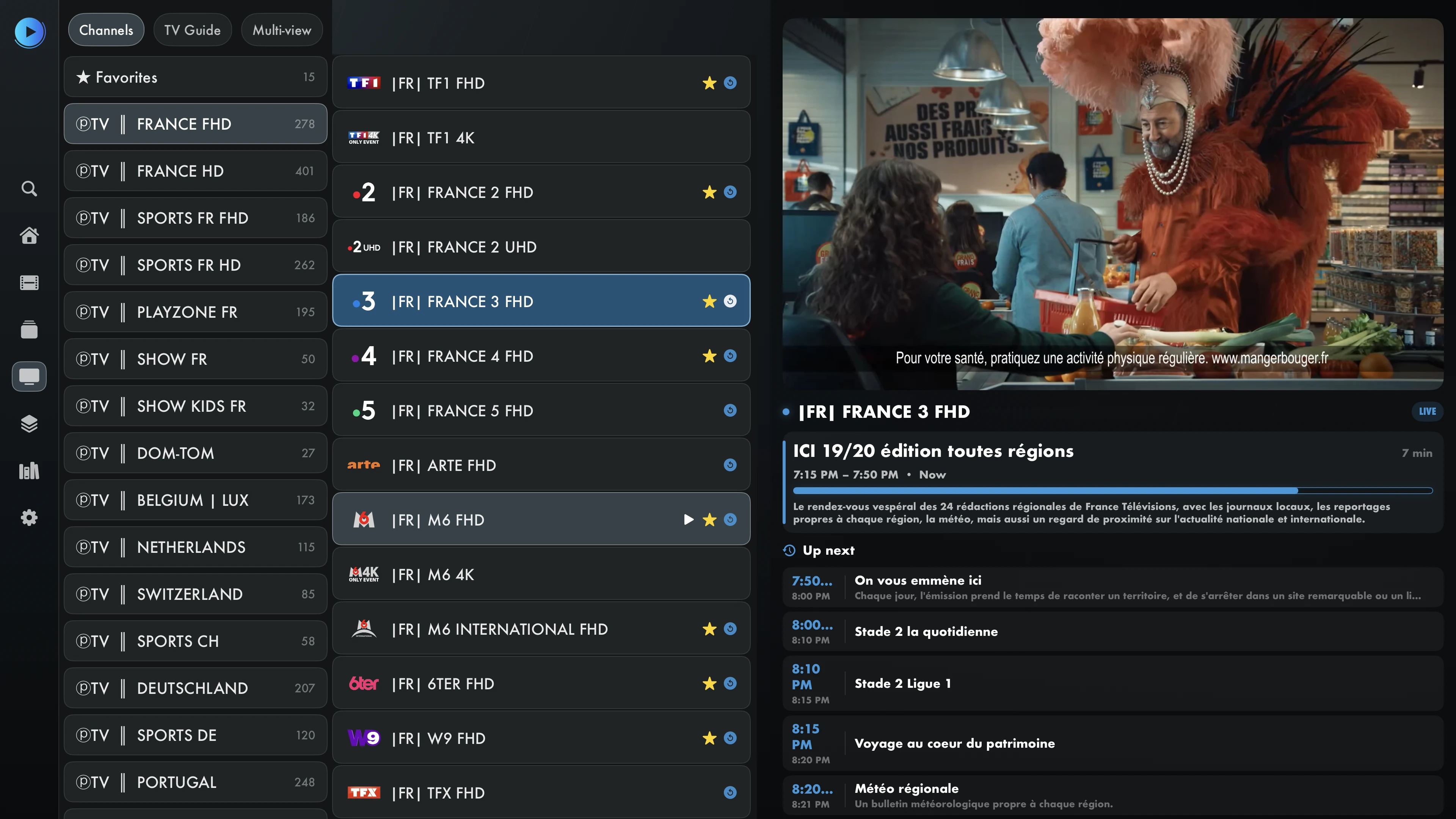
IPTVIO on Apple TV: expanded main menu and categories, setup QR code, favorites, catch-up and a French channel playing live.

Remote navigation, favorites and playback progress.Real Apple TV screenshots · English interface

Captured on a physical Apple TV. Titles and categories from your sources may keep their original language. No content is included.

YOUR COMPATIBLE SOURCES AND SERVICES

Xtream CodesM3U / M3U8Stremio add-onsXMLTVTraktiCloudSMB

TV and video

Live TV, movies and series

Switch from live TV to a movie or series without changing apps. Find your favorites and pick up videos where you left off.

Live TV and the program guide

Switch channels, check upcoming programs and set reminders in the TV guide. You can access your favorite channels there too.

TV guide on Apple TV

Movies and series from your IPTV sources

Browse your IPTV provider’s movies and series, open their details and explore available cast, seasons and episodes. No addon is needed to use your IPTV source.

Movies and series on Apple TV

Catalogs and collections

Catalogs compatible with Stremio

Add extensions that support the Stremio add-on protocol to browse their catalogs and playback sources in IPTVIO.

IPTVIO is an independent app, unaffiliated with and not endorsed by Stremio. Compatibility depends on the add-ons you use.

Connect your add-ons

Add compatible extensions using their manifest links. Browse their catalogs, explore movie and series details, then choose an available playback source.

Movies from compatible Stremio catalogs
Your add-on catalogs, available directly in Catalogs.

Automatically play the first source or return to the last one you used.

Create your own collections

Bring the catalogs you love into your own collections. A movie folder, favorite genres or a weekend watchlist: choose the names, artwork and logos.

Catalog collections and folders on Apple TV
An example collection created in IPTVIO, with custom folders, artwork and organization.
Example of personalized collections with logos and movie universes
An example using custom logos to organize catalogs. The services and content shown are not included.

Create, import and organize collections from the web: folders, appearance, sources and display order.

IPTVIO supports add-ons compatible with the Stremio protocol. Availability and streams depend on each add-on. IPTVIO does not provide any content.

Customization

One app. Different moods.

Ocean is your starting point: a deep blue background, blue accents and the Cyan Blue logo. Make it yours with full black, different colors, fonts and menus.

  • Colors and logo
  • Menus and categories
  • Text and subtitles

Navigation

Fast, smooth navigation

Browse categories with your remote and switch quickly between channels. Adjust playback settings to suit your connection and sources.

01 / BROWSE

Customizable shortcuts

Choose which categories appear and which screen opens at launch for quicker access to what you watch most.

02 / WATCH

Fine-tune your playback

Choose a player engine and adjust buffering or hardware decoding to suit your sources and Apple TV.

03 / CONTINUE

Continue watching

Pick up movies and series where you left off. The next episode can start automatically.

Playback smoothness and start times also depend on the stream, network and hardware.

Beyond the poster

Find your next movie. Get to know the story.

See title artwork, cast and the full synopsis. Select an actor to explore related titles available from your sources.

IPTVIO movie details with poster, cast and playback actions.
Information and artwork depend on the source and available metadata.

Explore the cast

Open an actor’s page to find their movies and series. In the IPTV section, results come from your provider.

TraktKeep track with Trakt

Connect your Trakt account to track the movies and episodes you watch and access your history.

InfuseChoose your player

Adjust buffering, audio tracks and subtitles. You can also open compatible videos in Infuse when the app is installed.

Playback

The player and TV guide

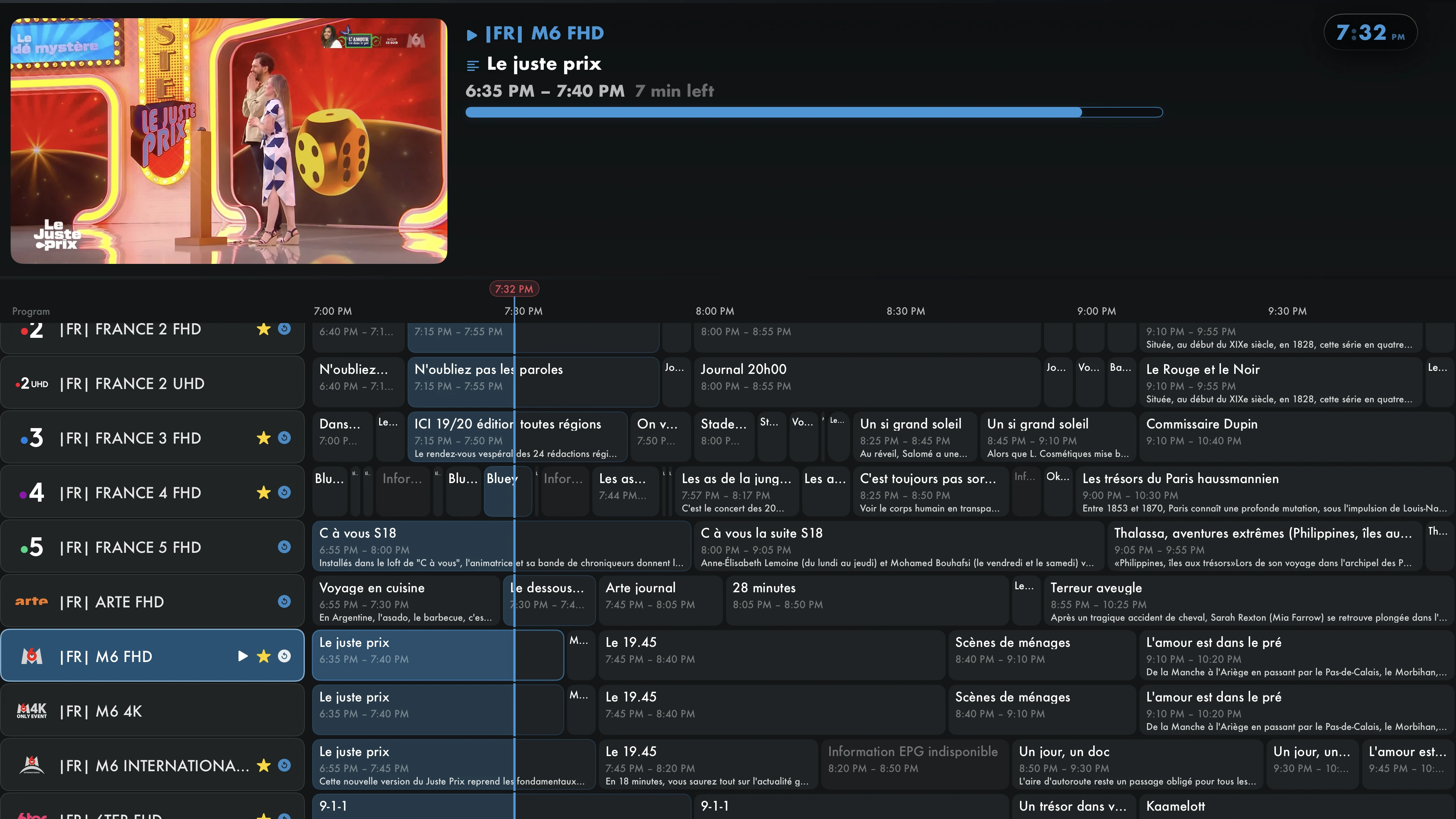
Use your remote to bring up the playback controls. Open the transparent guide from full screen to check programs while the video keeps playing.

IPTVIO playback controls while watching a French channel
Playback controls, right on your video.
Transparent EPG over a French channel playing in full screen
Open the guide without leaving full screen.

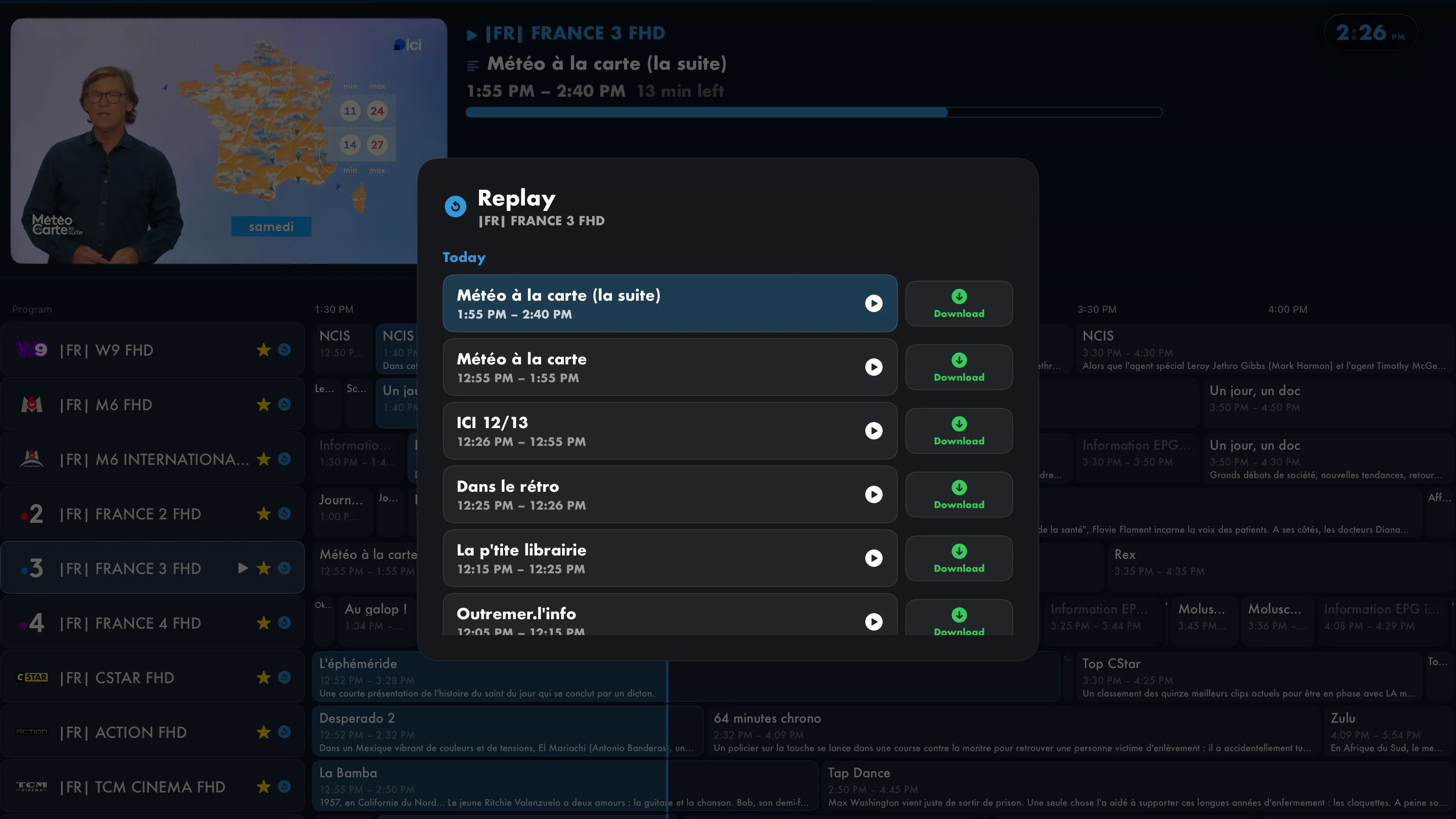
Replay

Watch it again. Or download it for later.

Choose a program from your channel’s archive. Play it or download it from the same window, when supported by your source.

Replay window with France 3 programs and Download buttons, while live TV keeps playing.

Offline

Watch without an internet connection

Save a movie, an episode or a catch-up program for later. Download compatible videos to your Apple TV and find them in Library, even without an internet connection.

  • Compatible movies, episodes and catch-up programs
  • Downloads together in your library
  • Playback in the IPTVIO player
Compare features
Project Hail Mary opened from Catalogs on Apple TV, with the Download control.

The source must support and permit downloading. Downloads depend on available storage, and tvOS may remove files to free up space. Check that your videos have finished downloading before going offline.

Network library

Watch videos from your NAS

Connect your NAS or a computer over SMB, then browse its folders in the IPTVIO library.

Library on Apple TV: SMB access to a NAS, favorite folders and videos.
The Network tab in Library, showing a NAS folder and personal videos saved as favorites.

Connect your server

Add your server address and credentials. You can choose a share or starting folder.

Browse your videos

Browse folders and network favorites in the library, or continue watching a video you started earlier.

The same player for your files

Play files from your network in IPTVIO without first copying them to your Apple TV.

Choose a profile — Alex and Emma

Profiles

Profiles and parental controls

Each profile keeps its own sources, favorites and preferences. Parental controls let you restrict access to content.

Personal profiles

Each person has their own avatar, favorites and library.

Parental controls

Protect channels, categories, movies and menu sections with a PIN you can change. You can also manage restrictions from the local web interface.

Compare features

Favorites

The favorites manager

Add a channel to favorites or open the manager to select several at once. You can also select an entire category, remove channels and save all your changes together.

01

Select channels or categories

Select channels individually or choose an entire category.

02

Edit several favorites at once

Add, remove and save all your changes in one go.

03

Your favorites in the TV guide

Sync your favorites across your Apple TVs with iCloud.

IPTVIO favorites manager with a selection of French channels
Select several channels in the manager before saving your changes.

Web setup

Set up IPTVIO in your browser

Use a browser on your phone or computer, connected to the same network as your Apple TV.

Start with a QR code

Scan the QR code or use the PIN. Add your first playlist, update your credentials and set up the EPG, your extensions or your first profile.

Organize from your browser

Reorder and hide channels and categories. Create collections, import their settings and manage parental restrictions.

Access on your local network

Web setup works on your local network without an IPTVIO account. You can turn iCloud sync on or off in the app.

Privacy

IPTVIO Pro

Free features and Pro options

Live TV, IPTV movies and series, compatible add-ons and browsing collections: included.
Pro adds offline viewing, parental controls and advanced tools.

IPTVIO

INCLUDED

FreeLive TV, movies and series.

  • One playlist and your first profile
  • Live TV, TV guide, movies and series
  • Compatible Stremio add-ons and browsing collections
  • Resume watching and automatic next episode
  • Personalization and WireGuard
  • Initial setup from the web
Discover the app

IPTVIO PRO

PRO

Monthly, yearly or lifetime.The same features in every plan.

  • Everything included in IPTVIO
  • Multiple playlists and profiles
  • Parental controls and multiview
  • Downloads and offline playback
  • Catch-up and live TV pause (timeshift)
  • NAS / SMB, iCloud, Trakt and automatic sources
  • Web organization and collection editing
  • Advanced favorites manager
View pricing

Choose your plan

Every plan includes the same Pro features. The duration and billing are different.

Monthly

CHF 1.80/ month

Billed monthly.

Yearly

CHF 15/ year

One payment for 12 months.

Lifetime

CHF 50

One-time purchase. No renewals.

Reference prices for Switzerland. Local pricing and availability are confirmed by the App Store before purchase.

Find these plans in the app

Apple displays prices, durations and any trial terms before purchase. No IPTV subscription, VPN service or third-party service is included.

Compare all features

THE FULL COMPARISON

The full comparison

39 features to compare

IPTVIO and IPTVIO Pro feature comparison
FeatureIPTVIOFreeIPTVIO ProAll features
Your sources and live TV
Xtream Codes, M3U and M3U8Import your channels, movies, series and categories.1 playlistMultiple playlists
Multiple playlistsMultiple IPTV sources in one player.
Live TV and favoritesChannel switching, history and unlimited favorites: add and remove channels individually.
Advanced favorites managerSelect channels or entire categories, then save additions and removals in one batch.
TV guide / EPG and XMLTVPrograms, custom EPG sources, channel matching and reminders.
Stream format selectionAutomatic selection, HLS or MPEG-TS.
Replay / catch-upBrowse archived programs and download catch-up videos when supported and permitted by your source.
Live TV pause / timeshiftBuffer live TV and go back within the available window, using a compatible player and stream.
MultiviewUp to four channels, with audio source selection.
Movies, series, Stremio and collections
Movies, series and detailed informationFull synopsis, year, cast, director, artwork and trailers, when metadata is available.
Continue watchingResume playback and mark content as watched.
Automatic next episodePlay episodes consecutively in the compatible built-in player.
Stremio add-on compatibilityAdd manifests, browse catalogs and select available sources.
Collections and foldersBrowse your collections and their folders.
Automatic catalog sourcesResume the last source used or play the first available one.
Web collection editingCreate, import JSON, organize folders, sources and appearance.
Collection JSON exportExport from the local web interface.
Family and personalization
First profile and avatarOne profile for your sources, favorites and settings.
Multiple user profilesSeparate sources, favorites and preferences for everyone.
Parental controlsChangeable PIN and per-profile restrictions for channels, categories, movies and menu sections. Manage them on TV and through the local web interface.
Colors, logos and fontsThemes, fonts, text size and interface appearance.
Custom menus and categoriesReorder, show and hide items in the app.
Startup and clockStartup screen, clock size and 12-hour AM/PM or 24-hour time, including the TV guide.
Multilingual interfaceFrench, English, German, Italian and Spanish.
Top Shelf on Apple TVAccess playback progress from the tvOS Home Screen, depending on your settings.
Playback, audio and subtitles
Player engines and performanceLive TV and library engines, buffering, decoding and networking.
Audio and preferred languagesTrack selection, primary and secondary languages, audio output for compatible videos.
Customizable subtitlesLanguages, size, position, colors, background and outline.
Frame rate and resolutionMatch content to the capabilities of the player, Apple TV and television.
External playback with InfuseOpen compatible media when Infuse is installed. Infuse has separate terms.
Sync and library
iCloud syncSources, profiles, favorites, progress and settings across Apple TVs using the same account.
Trakt syncAccount connection, playback tracking and movie and episode history.
NAS / SMB network libraryBrowse and play files from a network share.
Downloads and offline playbackCompatible movies, episodes and catch-up videos saved to your Apple TV. Subject to source permissions, available space and tvOS storage rules.
WireGuard VPNImport and use your own configuration. VPN service not included.
Browser setup
Local web access by QR code or PINSet up on your network from a phone or computer.
Initial setupSources, EPG, add-ons, VPN and first profile. Source and profile limits apply.
Advanced channel and category organizationSort, rename, hide, reorder and manage items in bulk from the web.
Advanced movie and series organizationSort and organize categories in your browser.

Playback features depend on your sources, hardware and third-party services. For multiview, your provider must allow the number of simultaneous connections used. In-app personalization is separate from advanced web organization.

Getting started

Setting up IPTVIO

01

Open IPTVIO

The app is designed for Apple TV with tvOS 17.6 or later. Contact us for availability.

02

Add your sources

Enter your Xtream Codes credentials, an M3U playlist or Stremio add-ons, on the TV or through the local web interface.

03

Customize and start watching

Choose your layout, organize your catalogs and start a channel, movie or episode.

IPTVIO is a player. No channels, movies or IPTV subscriptions are included. Only add content you are authorized to access.

Help

Frequently asked questions

All help and support
Does IPTVIO provide channels or a subscription?

No. IPTVIO is an independent media player. It does not provide, sell or host channels, playlists or content packages. You use your own sources and must have the necessary access rights.

Which devices does IPTVIO support?

This version is designed for Apple TV running tvOS 17.6 or later. You can use your phone or computer to configure the app through its local web interface. Versions for iOS and iPadOS are in development and coming soon.

Which playlist formats are supported?

Xtream Codes and M3U / M3U8 playlists are supported. You can also add XMLTV guides and compatible Stremio add-ons for their catalogs and authorized streams.

How do Stremio-compatible add-ons work?

Add the manifest of a Stremio-compatible add-on to access its catalogs and available sources. Third-party services and subscriptions remain separate. The comparison lists the features in each plan. View the full comparison.

Is IPTVIO an official Stremio app?

No. IPTVIO is developed independently. Stremio is mentioned to describe support for its add-on protocol; this does not mean IPTVIO is affiliated with, endorsed by or provided by Stremio. Catalog and source availability depend on each add-on.

Can I watch movies and series offline?

Download compatible movies or episodes where the source permits it, then watch saved files without an internet connection. Not all streams can be downloaded. Available space and tvOS storage rules apply; tvOS may remove files to free up space. See the comparison for plan availability.

What can I customize?

Colors, logo, fonts, text size, in-app menus and categories, startup screen, clock and subtitles.

Are there parental controls and separate profiles?

Profiles keep preferences and libraries separate. Parental controls help manage access to content. See the comparison for the features in each plan.

How can I get the app?

The download link will be added when available. For current availability, email support@iptvio.ch.

Why do some features depend on my source?

Catch-up, the guide and some playback settings require data or formats supplied by your source. For multiview, your subscription must allow multiple simultaneous connections.

How is my data synced?

iCloud can sync sources and their credentials, favorites, profiles and playback progress across your Apple TVs. You can turn it off. The comparison shows availability; see the privacy policy for details and deletion options.

Are favorites free?

Yes. Add and remove individual channels with no favorites limit. The manager also lets you select whole categories and save additions or removals in batches. Availability is shown in the comparison.

The community

Your feedback helps shape IPTVIO

Missing a setting or finding something awkward to use? Let us know. Your feedback helps us find problems and decide what to improve next in IPTVIO.

Share an idea